Published by ReviewRemoval. Authorship, sources and correction standards.
On this page
Google notifies the reviewer when your business replies. The customer can then change their words, stars or photos. If they edit the review, Google displays the date of the latest edit. A post dated today can still describe a visit from weeks ago. Google’s guide to business replies · What reviewers can edit on Maps.
Did someone post a second review?
A fresh date in your reviews list can prompt two people on your team to answer the same customer. Open the review itself. Look for your existing reply and compare the current post with the direct link and wording you previously saved. A later date on the same review establishes when it was updated. You would need a separate observation to say the customer visited again.
To capture the direct link, open the review in Maps and use its sharing menu. A link to the whole business listing makes it harder for a colleague to find the same entry. Google’s steps for sharing a specific review.
Keep a short record of what changed
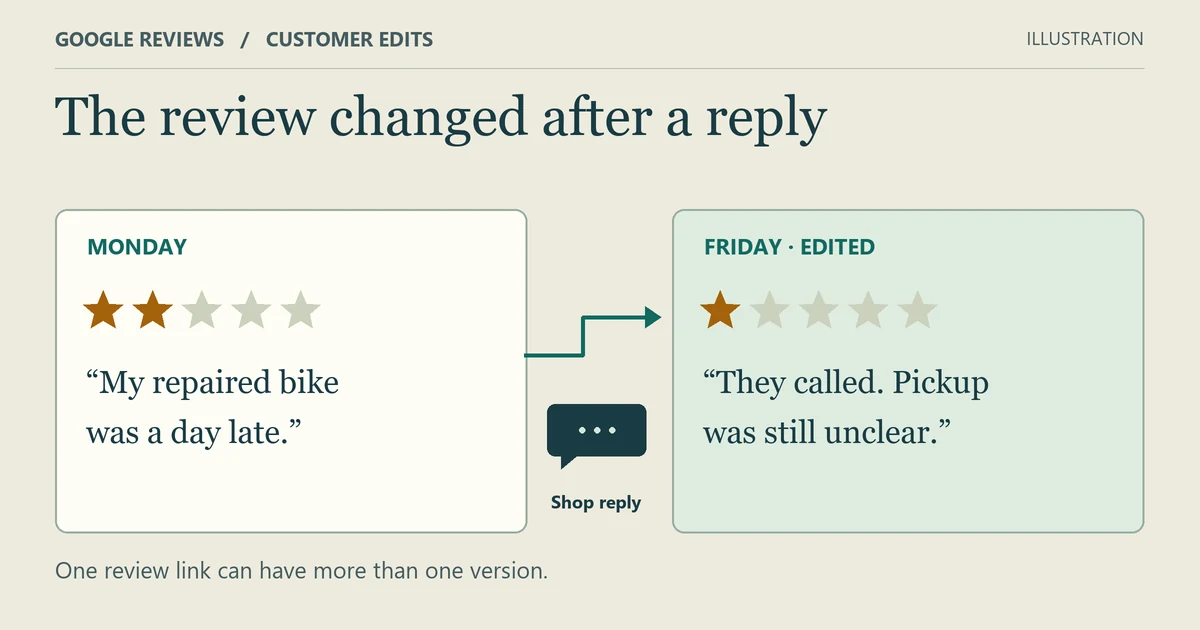
Here is a fictional handover between two managers at a bicycle shop in Victoria.
- Monday, first observed. A two-star review says a repaired bike was ready a day late. The opening manager saves the public link and the wording.
- Tuesday, shop reply. The shop acknowledges the delay and offers to check the pickup instructions.
- Friday, edit observed. The same review now shows one star. The customer adds that the shop called back, but the pickup time was still unclear. The closing manager records this new sentence and the date they saw it.
The Friday note tells the next manager why the public reply needs attention. If nobody saved the earlier version, record what is visible now. Mark earlier wording as unknown rather than reconstructing it from memory. Review evidence checklist.
Does your public reply still answer the complaint?
In the bicycle shop example, repeating “please call us” ignores the customer’s update that the call already happened. A better reply might read: “Thank you for taking the call. Our pickup instructions should have been clearer. We’ve added the collection time to the confirmation message.” The final sentence belongs in the reply only if the shop made that change.
A verified business can edit its own reply. Open Read reviews, find the business response beneath the customer’s review, select Edit and save the update. If only the stars changed and your reply still makes sense, you can leave it alone. Keep any refund or service remedy independent of a request to change a rating. Google prohibits incentives for revising or removing a negative review. Edit a business reply · Google Maps contribution policy.
What if the customer adds something reportable?
Suppose the customer attaches a photo of a collection slip that exposes another customer’s home address. The complaint about the late repair can be genuine while the photo introduces a separate privacy concern. Save the public link, the position of the image and a brief description of the disclosure. Keep the address out of your reply and any shared case notes. How to report a photo attached to a Google review.
If you have already reported the review, check the status of the existing case first. Preserve the date when you observed the changed content. If Google offers an appeal, explain which passage or photo is currently visible and why it matters. If your concern is solely that the customer lowered their rating, address the experience in your reply. Check a report’s status and appeal options.
Need help with a specific review?
If an edit introduces a possible policy issue, send the public review link and identify the change in a sentence. Keep sensitive details out of the assessment request.
Get an edited review assessed