Published by ReviewRemoval. Authorship, sources and correction standards.
On this page
If someone has contacted your business demanding money, goods or a favour to take down Google reviews, save the exchange and use Google’s merchant extortion report form. Google advises owners to avoid paying or engaging with the sender. You can file directly as soon as you have the details.
Which report fits what happened?
You received a demand tied to removing reviews. Record what the sender asked for and which reviews they referred to. A message to a branch manager counts as evidence even if it arrived outside Google, such as by email or text. Read Google’s directions for affected merchants.
Several low ratings appeared and nobody contacted you. The timing alone gives you no way to identify who arranged the posts. If you can document a policy concern, such as repeated text describing a service you have never offered, assess those reviews individually. See how to document a suspected fake Google review.
A customer left a complaint and asked for a refund. Check what the customer actually requested. A billing dispute by itself does not establish a demand in exchange for changing a review. Handle the complaint through your ordinary service channel and keep the rating out of any refund terms.
What to save while you still have the message
- The exchange. Keep the original conversation and a screenshot showing the demand, sender, date and time. Include the part that connects the payment to the reviews. A cropped image showing only an amount leaves Google guessing.
- The exact reviews. Open each affected review in Maps and copy its share link. Also copy the public profile link for the branch it appears on. A link to the branch alone can leave a reviewer looking through hundreds of posts. Google’s steps for copying a review link.
- The sequence. Record when staff first saw the reviews and when the demand arrived. Use the local time zone. If a second branch receives a message, add its location and review links separately so staff can follow the right case.
What a merchant can establish from one message
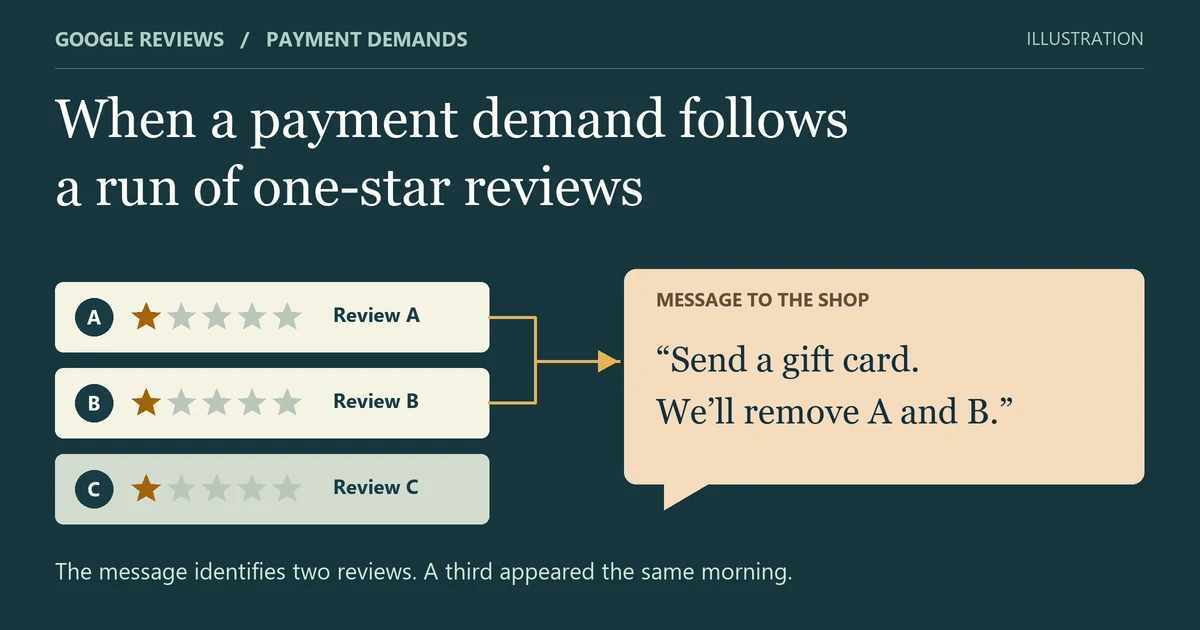
Consider a fictional Calgary repair shop. At 8:10 a.m. Mountain time, the manager spots three new one-star reviews. At 8:42 a.m., an email offers to take down two of them in exchange for a gift card. The sender includes screenshots of those two reviews.
“The sender identified reviews A and B in the attached email. We saved both public links. Review C appeared that morning as well. We have found no message linking it to this demand.”
That last sentence matters. It lets the shop document what happened to all three reviews without attributing the third one to an unknown sender. If the email named no reviews, the manager could record that uncertainty too.
What to do after filing
Keep the submission date, any confirmation you receive and the direct links in one place. Record Google’s response when it arrives. If a post disappears before then, note the date you last saw it. The case tracker can help colleagues keep separate records for each branch.
If your business already sent money, contact the financial institution or payment provider that handled it promptly. Keep the payment record privately. The Canadian Anti-Fraud Centre also explains how to report fraud to local police and the national reporting system. Canadian fraud reporting guidance.
Need help with a specific review?
Have several review links across Canadian locations? Share a public link and a brief account of the demand. We can help identify what belongs in the report. Keep the original messages for Google’s secure form.
Get a free assessment of the reviews